What this is for
You need to sign in before you can call clients.
Before you start
- Your username and password.
- Access to your email, if this is a new computer.
Steps
Type your username in the Username box.
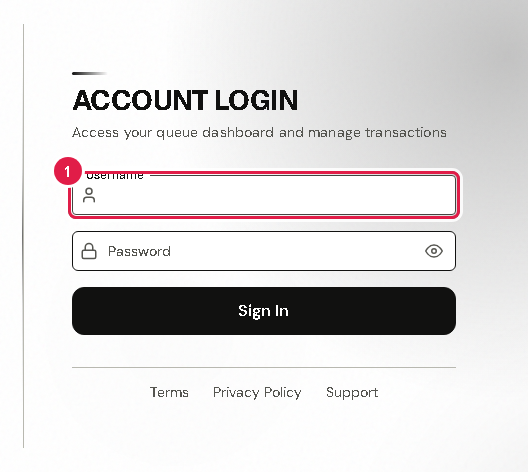
Type your password in the Password box.
Tap Sign In.
If you see Two-Factor Authentication, check your email. Type the 6-digit code from the email.
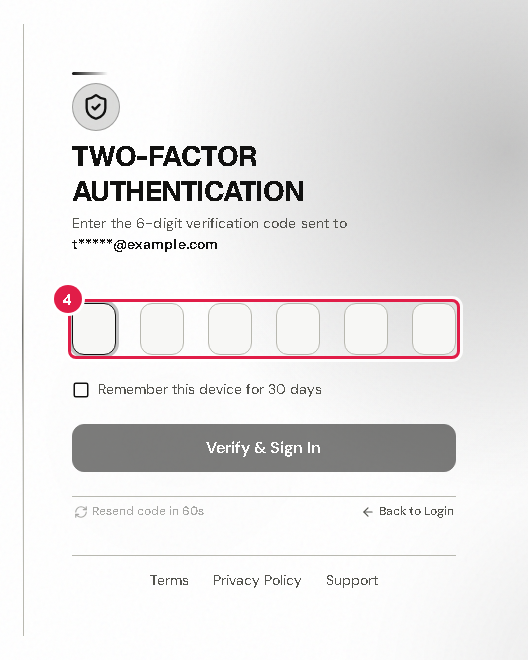
On your own work computer, tick Remember this device for 30 days. Then you will not need a code each time.
Tap Verify & Sign In. Your Dashboard opens.
Tip If the system asks you to make a new password, type it in New Password and again in Confirm New Password. Then tap Update Password.
If something goes wrong
- No code in your email: wait a minute, check your spam folder, then tap Resend verification code.
- You forgot your password: ask your office admin or the system admin to reset it.
- Wrong page or stuck: tap Back to Login and start again.