What this is for
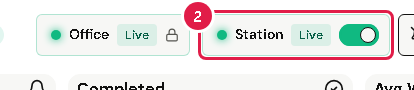
The chips at the top of the page show if your office and station are shown on kiosks.
Before you start
- You are signed in and have a station.
Steps
Look at the top of the page. The Station chip says Live (shown on kiosks) or Hidden (hidden from kiosks).
To change it, tap the switch on the Station chip.
The Office chip has a lock. Only the office admin can change it.