What this is for
The live queue page shows who is being served now and your place in line. It updates by itself every few seconds.
Before you start
- You tracked a ticket, or tapped Proceed to Live Queue.
Steps
Find YOUR ACTIVE TICKET. The badge shows your place, for example #3 in line. Your ticket also has a star in the NEXT UP list.
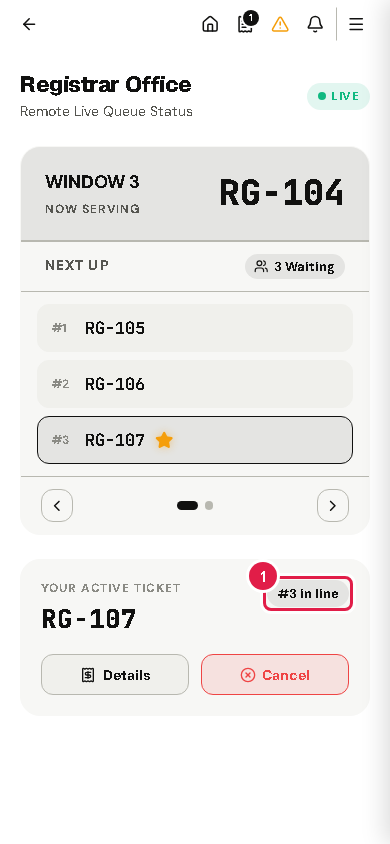
At the top, NOW SERVING shows the number each window is serving.
When your turn is near, Your Turn is Approaching! pops up. Start walking to the office.
Tap I'm on my way, or I need more time if you need a moment. The staff at the counter see your answer.
When the counter calls you, the page shows NOW SERVING YOUR TICKET! Go to the counter.
After you are served, the page shows Service Concluded. You can rate your visit with Evaluate Service Experience.
Tip Keep the remote portal open. The alert in step 3 shows on its pages, and EZQueue also emails it to you. The portal also offers an Android app (Download App) for push alerts.
If something goes wrong
- "No Active Ticket Found": the ticket is no longer in the line. Tap Track Another Ticket to look up another code.